
Create Powerful Gutter Estimates Instantly.
The RGA Estimator is an easy to use in-browser mobile drawing application for gutter contractors, salespeople, and estimators. Works on any device - desktop or mobile. Totally free to use - no account, download, subscription, or setup required.
Write your awesome label here.
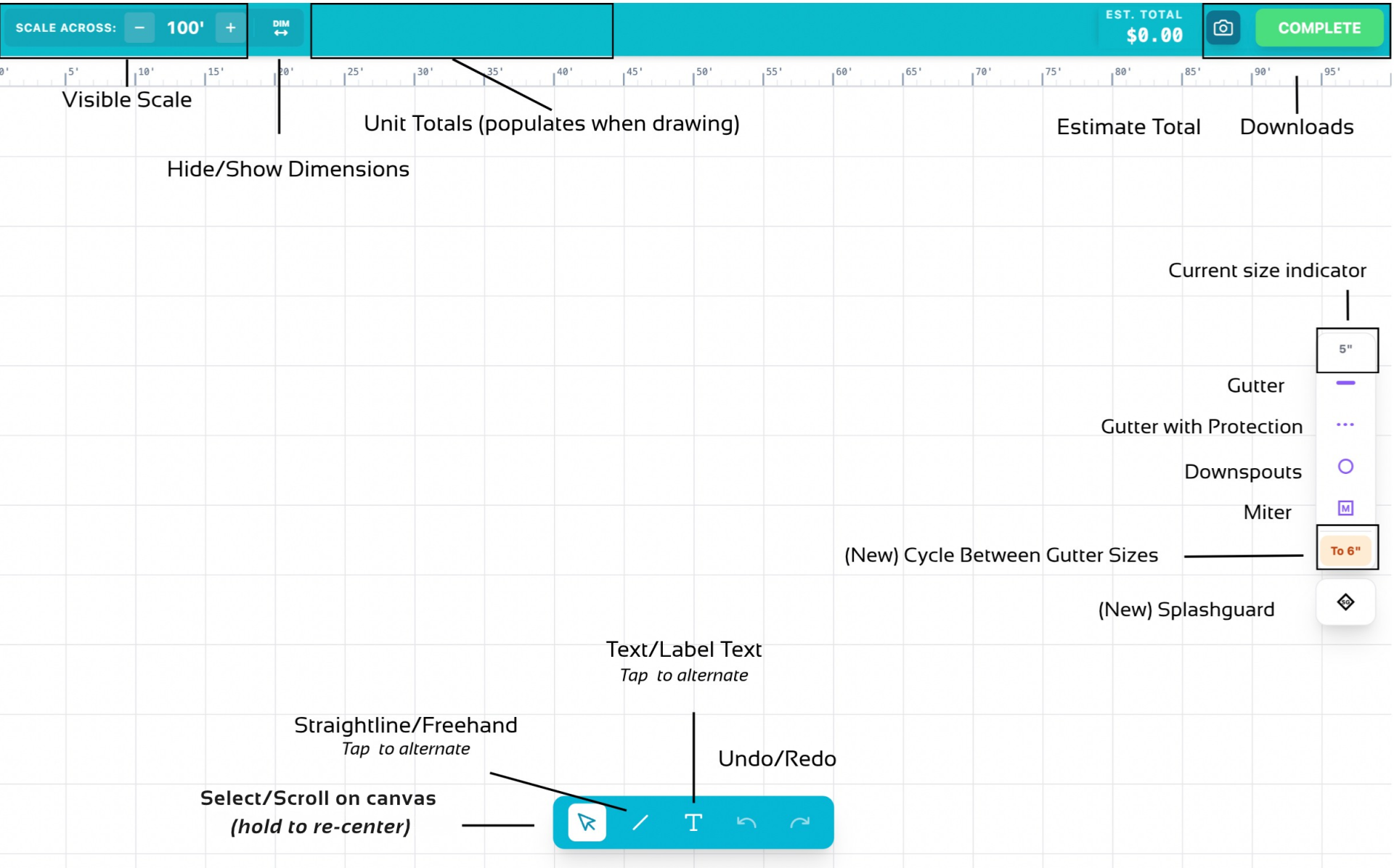
Canvas Controls
RGA Video Walkthrough
Need help? Watch the tutorial before drawing.
Write your awesome label here.
V4 of the RGA Estimator is Live!
V4 enhances the UI, smoothing out rough edges to make drawing gutter maps and estimates even more intuitive - and for desktop users, we've added keyboard shortcuts.
I've also created a help page for common questions about the estimator - this also serves as dev journal with notes on future development.
We're getting more interest in a paid version of the estimator as well. If you would like a paid version, reach out to noah@raingutterassociation.org
I've also created a help page for common questions about the estimator - this also serves as dev journal with notes on future development.
We're getting more interest in a paid version of the estimator as well. If you would like a paid version, reach out to noah@raingutterassociation.org
"Spacetime" canvas feel.
I want the experience of drawing your gutter maps to feel more tactile. The grid now responds to your touch, subtly warping to indicate where you are drawing, similar to how gravity bends spacetime (or how paper responds to your touch).
This feels nice, yo.
This feels nice, yo.
Seamless Experience
The two primary pages (the canvas and estimate preview) now "slide" between each other - this small changes helps reduce cognitive load between transitions.
Recenter Canvas
Holding the select tool down now recenters the canvas. This current implementation isn't quite perfect, but it works well enough.
Reduced Auto-Pan Speed
I updated the auto-pan functionality on the canvas to significantly reduce the scrolling speed when an item is drawn beyond the canvas boundary.
You will be less likely to shoot past a lines intended location.
Added signature options to the estimate preview
You can now add signatures (yours and the customer's) to the estimate. Tapping the boxes will bring up a space where you can sign in the app.
Keyboard shortcuts!
Desktop users can take advantage of keyboard shortcuts (visible on hover) to quickly knock out their drawing.
These should also work on tablets and phones if you've connected a keyboard., although the tooltip doesn't show the shortcut on hover.
These should also work on tablets and phones if you've connected a keyboard., although the tooltip doesn't show the shortcut on hover.
Totals View
You now change the line item report to a totals view - hiding all line items from the estimate and just showing what the job will cost in total.
Cursor Update
The on-screen cursor now changes depending on what tool or mode you are in - this will help with usability for first time RGA Estimators!
DESIGN. PROTECT. ENHANCE. SEAMLESSLY.
Copyright © 2026
Created with